

Modern software development demands fast, scalable, and fault-tolerant CI/CD pipelines. To meet these needs, we’ve architected a GitLab CI/CD solution that combines custom GitLab Runners across multiple AWS regions with robust monitoring and deployment workflows.
This article walks through two core components:
- Multi-Region GitLab Runner Architecture.
- CI/CD Pipeline Flow Using GitLab & AWS.
Multi-Region GitLab Runner Architecture (High Availability)
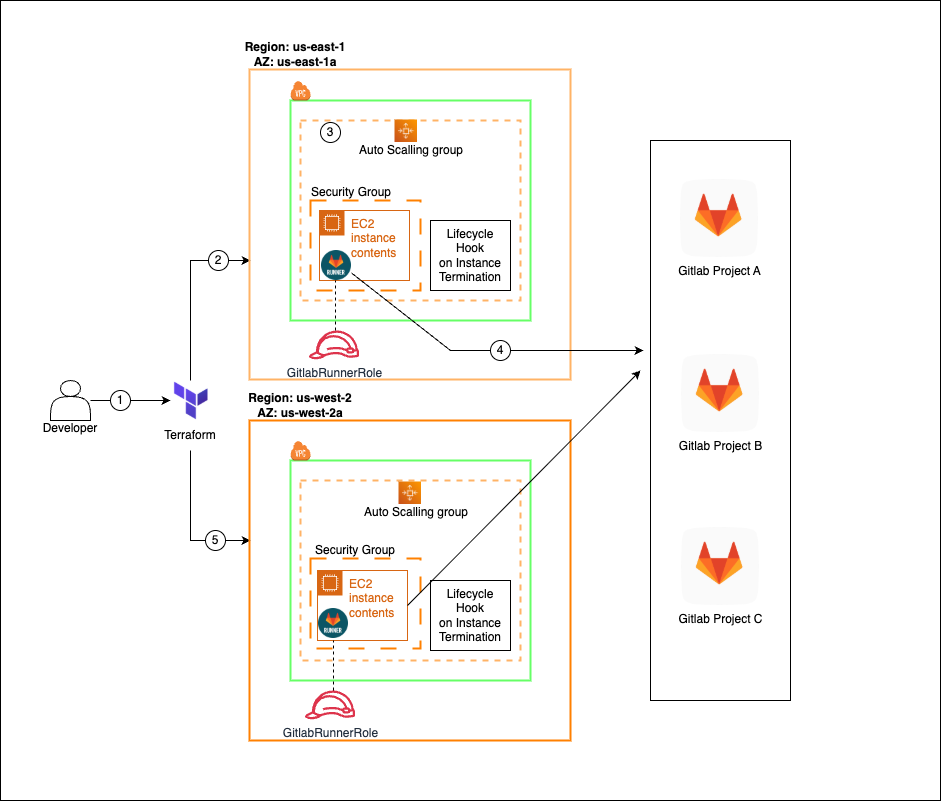
To ensure high availability and regional redundancy, GitLab Runners are deployed using Terraform across two AWS regions (us-east-1 and us-west-2). Here’s how it works:
🔍 Key Features:
- Terraform-Based Provisioning
Infrastructure is fully automated using Terraform, enabling reproducible and version-controlled deployments. - Auto Scaling Groups (ASGs)
Each AWS region has an ASG to automatically scale GitLab Runner EC2 instances based on job load and usage. - Lifecycle Hooks
Lifecycle hooks ensure clean deregistration of runners before instances are terminated, preventing job interruption. - Regional Redundancy
Runners are deployed in multiple AWS regions (e.g.,us-east-1,us-west-2) to ensure high availability and fault isolation. - IAM Role Isolation
EC2 instances use a dedicated IAM role (GitlabRunnerRole) with least-privilege access to necessary AWS services. - Security Groups
Instances are secured using AWS Security Groups, allowing only essential inbound/outbound traffic such as GitLab job execution and Docker image pulls. - Networking (VPC & Subnets)
Runners are deployed within private subnets of a VPC, ensuring network isolation. NAT Gateways or VPC endpoints enable outbound internet access while restricting direct public exposure.
This setup supports GitLab Projects A, B, and C, enabling job distribution and high throughput builds across multiple teams.
GitLab CI/CD Pipeline Overview
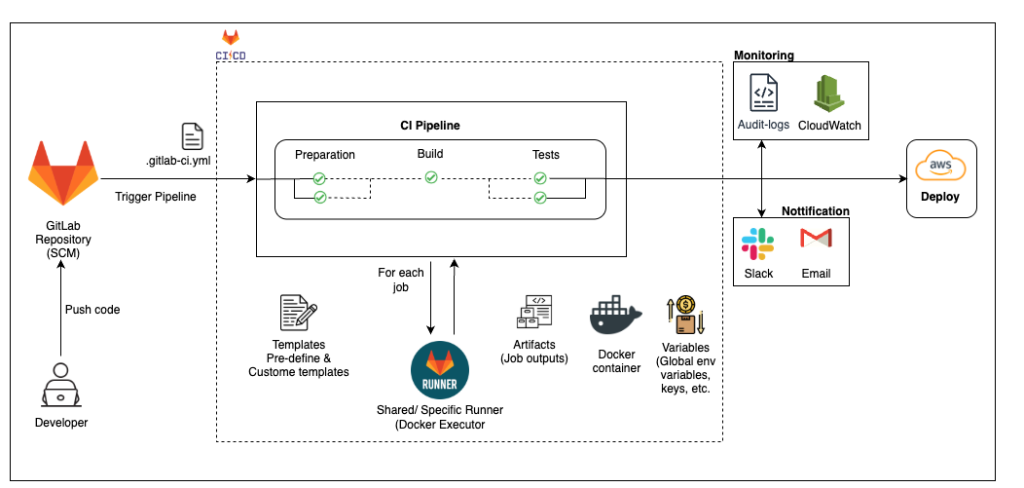
This diagram illustrates the full CI/CD flow triggered by GitLab and managed through custom runners:
🛠️ Flow Breakdown:
- Code Push & Pipeline Trigger
Developers push code to GitLab, which triggers the.gitlab-ci.ymlpipeline. - CI Pipeline Stages
The pipeline is broken into stages: Preparation → Build → Test. - Runner Execution
Jobs are executed on shared or specific GitLab Runners using Docker Executors. - Job Components
- Templates: Predefined or custom
.ymltemplates define job structure. - Artifacts: Build/test outputs are stored and passed between jobs.
- Variables: Global environment variables and secrets are securely injected.
- Docker Containers: Jobs run inside clean, isolated containers.
- Templates: Predefined or custom
- Deployment to AWS
After successful builds and tests, code is deployed to AWS. - Monitoring & Notifications
- CloudWatch and Audit Logs monitor pipeline and infrastructure health.
- Slack/Email notifications inform developers of pipeline status.
🔐 GitLab Security Templates
Security/SAST– Scans your source code for security vulnerabilities during development.Security/DAST– Tests your running application for runtime security issues.Dependency-Scanning– Identifies known vulnerabilities in third-party libraries and packages.Container-Scanning– Analyzes Docker images for OS-level security flaws.Secret-Detection– Detects accidentally committed secrets like API keys or passwords.Coverage-Fuzzing– Sends unexpected inputs to find bugs and crash conditions in your code.

✅ Benefits of This Solution
- Highly Available: Cross-region runners avoid single points of failure.
- Scalable: Auto-scaling runners handle varying workloads dynamically.
- Secure & Isolated: Each job runs in containers with limited IAM roles.
- End-to-End Visibility: Logs, metrics, and alerts offer full transparency.
- Developer Friendly: Fully automated with reusable templates and fast feedback loops.